ClientPulse Site Reports transforms your white-label monthly site reports into client-ready PDFs—fully branded with your logo, colors, and custom footer.
Features
Monthly Report Generation — Generate detailed reports including traffic, sessions, and pageviews.
Uptime Tracking — Monitor site availability with a 30-day uptime percentage.
Update Log — Keep track of WordPress core, theme, and plugin updates.
Top Content Overview — Identify top-performing pages based on traffic and engagement.
White-Label PDF Reports — Customize reports with your agency's branding and no plugin credits.
Scheduled Email Delivery — Automatically send reports to clients without manual effort.
How it works
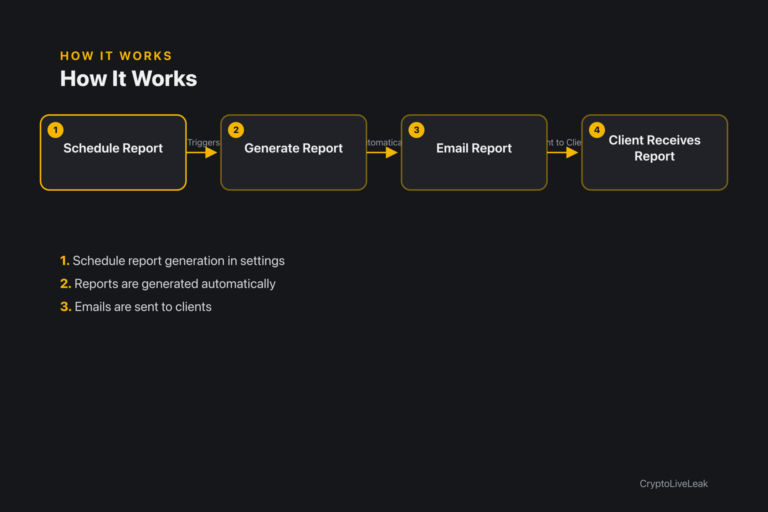
Schedule report generation in settings
Schedule report generation once in the settings.
Reports are generated automatically at the specified time each month.
Emails are sent to the configured recipient list without manual intervention.
Requirements
WordPress 6.0 or newer
PHP 7.4 or newer
Tested up to WordPress 6.6
Installation
Upload the plugin zip via Plugins → Add New → Upload Plugin.
Activate the plugin through the Plugins screen.
Configure settings under Settings → ClientPulse Site Reports.
Frequently asked questions
Where can I find the settings for the plugin?
You can find the settings under Settings → ClientPulse Site Reports.
What kind of data is included in the reports?
Reports include traffic data, uptime tracking, updates applied, and top content.
Can I customize the branding of the reports?
Yes, you can upload your logo and choose brand colors for the reports.
How often are the reports generated?
Reports are generated monthly based on your configured schedule.
Is client data secure in the reports?
Yes, no sensitive data or credentials are included in the reports.
White-label monthly site reports for agencies. Traffic, uptime, updates, top content—emailed as branded PDF.Automated monthly report generationCustomizable branding optionsScheduled email delivery to clients